MTClean: The Complete Storage Cleaner & Optimizer for Mac and Windows
Clean junk, large and duplicate files, uninstall apps completely, free up memory and speed up your Mac and Windows with MTClean. A complete guide to every feature.
 Milad Mostafaei
10 min read
Milad Mostafaei
10 min read
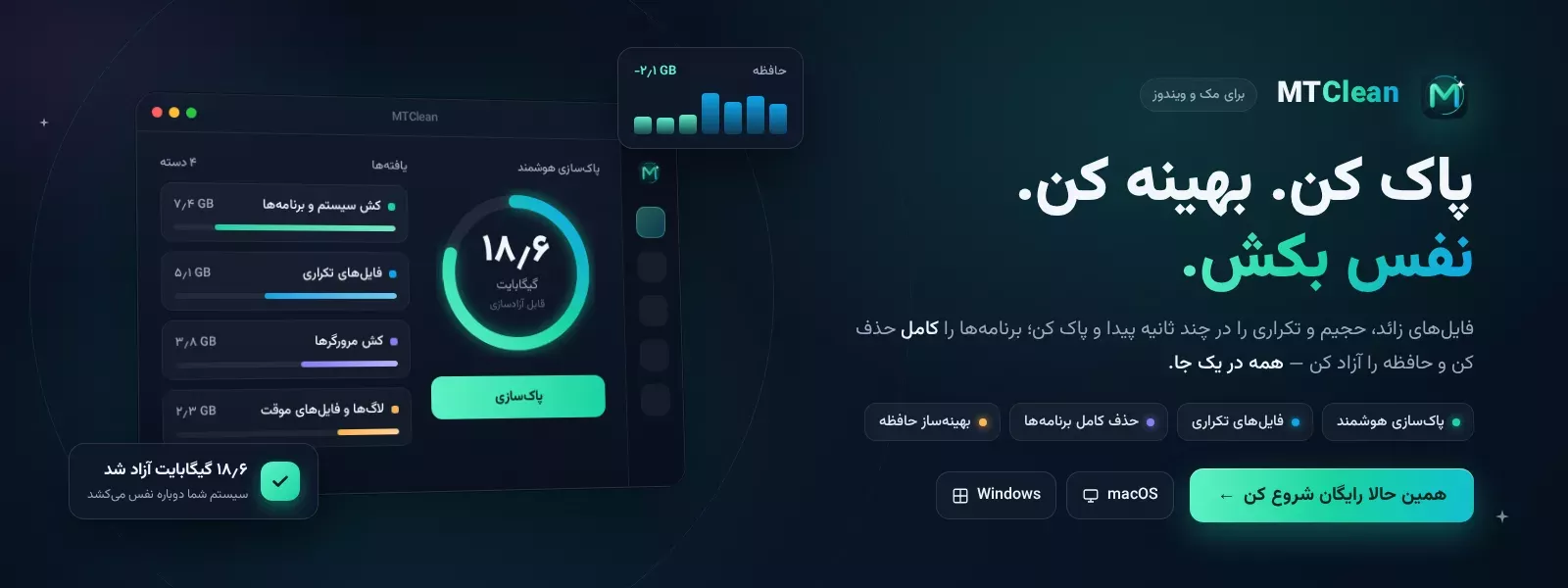
Table of contents
- What is MTClean and why do you need it?
- A smart dashboard — see everything at a glance
- Smart Clean — your whole device in one scan
- The Junk Cleaner — the heart of MTClean
- Find large files — hunt down the hidden giants
- Find duplicate files — say goodbye to extra copies
- Uninstall apps completely — with zero leftovers
- Optimizer — free memory and take control of startup
- Disk Analyzer — see exactly where your space went
- Full settings and personalization
- Free and Pro versions
- Availability and languages
- Frequently asked questions about MTClean
- Is it safe to delete files with MTClean?
- Which systems does MTClean run on?
- How much space can I free up?
- Is the free version enough?
- Conclusion
If you have been looking for a storage cleaner and optimizer for Mac and Windows that is both simple and genuinely effective, MTClean was built for exactly that. When your disk fills up, your laptop slows down and the dreaded "your startup disk is almost full" message appears, most of that lost space comes from junk you never created yourself: caches, logs, temporary files and the leftovers of apps you deleted long ago. MTClean is a native cleaner and optimizer for macOS and Windows that finds this hidden clutter, removes it safely and makes your computer fast again — all from one beautiful, smooth app.
In this complete guide we walk through every MTClean feature, from the smallest to the largest, so you know exactly how to free up gigabytes of space and keep your machine fast and tidy.
What is MTClean and why do you need it?
MTClean is a desktop app to clean Windows and free up space on your Mac, running natively on both platforms. Unlike many similar tools, MTClean runs every scan and cleanup in native code, which means it is fast, precise and never bogs the system down. Its motto is simple — "Clean. Optimize. Breathe." — and that sentence sums up exactly what it does for you.
Most importantly, MTClean respects your privacy. Nothing is uploaded; everything is processed on your own device. You decide what gets removed, and the app always asks for confirmation before it deletes anything.
A smart dashboard — see everything at a glance
The moment you open MTClean, a clean, readable dashboard greets you with the full health of your device at a glance. You can see how full your storage is, how your memory (RAM) is doing, how busy the processor is, and how long the machine has been running. A "memory pressure" indicator tells you in plain language whether the system is strained or breathing easily.
The dashboard also lists every connected drive and volume, shows the total space you have freed with MTClean so far, and reminds you when you last ran a cleanup. A "quick actions" area lets you run the most common tasks with a single click.
Smart Clean — your whole device in one scan
If you do not have the time or patience to go section by section, Smart Clean is your best friend. With one button, MTClean finds all the junk, caches, logs and leftovers in a single pass and presents them for review. You simply look, confirm, and you are done — gigabytes freed in seconds. It is the fastest way to speed up your computer.
The Junk Cleaner — the heart of MTClean
The most powerful part of the app is the Junk Cleaner. It targets exactly the files that waste space for no reason, and it explains each category so you can decide with confidence. The categories include:
User and system caches — temporary files apps create and rebuild on their own; completely safe to remove.
Log files — diagnostic reports written by apps and the system.
Temporary files — scratch files apps forgot to delete.
Trash / Recycle Bin — files waiting to be emptied.
Developer junk — Xcode, npm, pip, Gradle and build caches that can run to several gigabytes.
Browser caches — cached pages, scripts and images from your browsers.
Crash reports — files generated when apps crash.
Saved app states and Mail attachments downloaded for preview.
iOS device backups — full iPhone and iPad backups that can be very large.
Unused language packs and thumbnail caches.
Previous Windows installation (Windows.old) — files from an old Windows version that often take many gigabytes.
You can select each category separately and see the exact size of each before cleaning. This is exactly what makes MTClean a professional cleaner.
Find large files — hunt down the hidden giants
Sometimes just a handful of big files has swallowed most of your disk. The Large Files tool walks through your folders quickly and lists the biggest files. You can set a minimum size and filter the results by type: video, images, archives, disk images, documents or other. In seconds you know where that forgotten movie or old installer has been hiding.
Find duplicate files — say goodbye to extra copies
Duplicate files are one of the biggest causes of a needlessly full disk. The Duplicate Finder in MTClean compares files byte for byte with full accuracy, so it only flags truly identical copies — not things that merely look alike. Then, with options like "keep newest", "keep oldest" or "auto-select", you can keep one copy and remove the rest with a single click, without ever worrying about deleting something important by mistake.
Uninstall apps completely — with zero leftovers
When you remove an app the usual way, it typically leaves support files, caches and preferences behind on your device. The Uninstaller in MTClean solves this: it removes the app together with every leftover it created. Before removing, you see exactly how many files and how much space will be cleared. No more clutter from old apps.
Optimizer — free memory and take control of startup
The Optimizer does two important things. First, it frees up memory (RAM) with one click so a sluggish machine runs smoothly again; it also shows memory details such as used, free, compressed and cached, and lists the top resource-hungry processes. Second, it manages startup items — the programs that launch automatically when your device turns on and slow the boot down. By disabling the ones you do not need, your computer starts up faster.
Disk Analyzer — see exactly where your space went
The Disk Analyzer shows your entire disk as a beautiful visual map (a treemap). Each block is a folder or file, and the bigger it is, the more space it takes. Click any block to drill inside and go as deep as you like. It is the best way to discover heavy folders you never would have suspected.
Full settings and personalization
MTClean adapts completely to your taste and language. The interface fully supports Persian (right-to-left) and English, and you can pick a dark, light or system-matched theme. For deleting files you have two modes: move to Trash (safer) or permanent deletion (instant space recovery). You can also set the large-file threshold, keep the "ask before deleting" option on, and reset your cleanup statistics whenever you want.
Free and Pro versions
You can start with MTClean for free; the free version has a daily cleaning quota that is enough for regular maintenance. Upgrading to MTClean Pro removes the limit and unlocks every professional feature, including full startup management and unlimited cleaning. Activation is automatic and works across multiple devices.
Availability and languages
MTClean is fully bilingual, with a complete right-to-left Persian interface alongside English, so it feels native wherever you are. All processing happens on your own device, so there is no concern about your data being sent to external servers — a cleaner that is private by design.
Frequently asked questions about MTClean
Is it safe to delete files with MTClean?
Yes. MTClean only targets junk and rebuildable files, explains each category, and asks for confirmation before any deletion. You can also enable "move to Trash" so you always have a way to recover.
Which systems does MTClean run on?
MTClean runs on both macOS and Windows and delivers the same native experience on each.
How much space can I free up?
It depends on your device, but caches, iOS backups, developer junk and a previous Windows installation often take several gigabytes that MTClean can reclaim.
Is the free version enough?
For everyday maintenance, the free version with its daily quota works well. If you need unlimited cleaning and full startup management, Pro is the right choice.
Conclusion
MTClean brings everything you need to clean and optimize storage on Mac and Windows into one beautiful, safe app: from Smart Clean and junk removal to finding large and duplicate files, uninstalling apps completely, freeing memory, managing startup items and visually analyzing your disk. If you want your device to be fast, tidy and full of free space again, get MTClean from its official page today and feel the difference.
منابع/Sources: shahrsakhtafzar.com, anzalweb.ir, sakhtafzarmag.com, mobilekomak.com
Comments (0)
No comments yet. Be the first!
Leave a comment